Wrap ListViewWebPart Column Headers
By Kit
I recently got asked if it was possible wrap the column headers in a list view web part. The user had a WebPart with quite a few columns with long names and was trying to prevent the page from scrolling left to right.
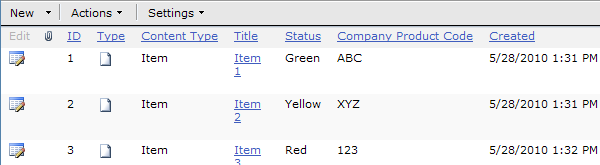
What we needed to do was wrap the column header so that it fit more to the data in the grid.
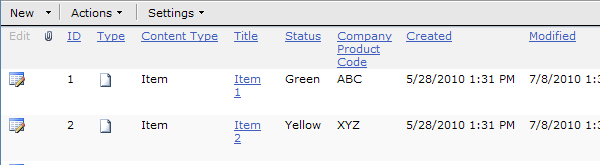
The solution is relatively simple to implement; all you need is a Content Editor Webpart at the bottom of the page somewhere with the following JavaScript in it:
<script type="text/javascript">
function WrapColumnHeaderText(columnName) {
try {
var tables = document.getElementsByTagName("table");
for (i = ; i < tables.length; i++) {
// find the table that is for the column we're looking for
var attrItem = tables[i].attributes.getNamedItem("displayname")
if (null != attrItem && attrItem.nodeValue === columnName) {
var cells = tables[i].getElementsByTagName("td");
for (c = ; c < cells.length; c++) {
if (null != cells[c].attributes.getNamedItem("nowrap")) {
cells[c].attributes.removeNamedItem("nowrap");
// after removing nowrap, IE won't actually wrap the content
// until it "changes".. so we touch it to force it to wrap
cells[c].innerHTML = cells[c].innerHTML;
break;
}
}
}
}
} catch (ex) {
alert(ex.toString());
}
}
function WrapColumnHeaders() {
// TODO: repeat the line below to wrap more columns
WrapColumnHeaderText("Company Product Code");
}
_spBodyOnLoadFunctionNames.push("WrapColumnHeaders");
script>
function WrapColumnHeaderText(columnName) {
try {
var tables = document.getElementsByTagName("table");
for (i = ; i < tables.length; i++) {
// find the table that is for the column we're looking for
var attrItem = tables[i].attributes.getNamedItem("displayname")
if (null != attrItem && attrItem.nodeValue === columnName) {
var cells = tables[i].getElementsByTagName("td");
for (c = ; c < cells.length; c++) {
if (null != cells[c].attributes.getNamedItem("nowrap")) {
cells[c].attributes.removeNamedItem("nowrap");
// after removing nowrap, IE won't actually wrap the content
// until it "changes".. so we touch it to force it to wrap
cells[c].innerHTML = cells[c].innerHTML;
break;
}
}
}
}
} catch (ex) {
alert(ex.toString());
}
}
function WrapColumnHeaders() {
// TODO: repeat the line below to wrap more columns
WrapColumnHeaderText("Company Product Code");
}
_spBodyOnLoadFunctionNames.push("WrapColumnHeaders");
script>